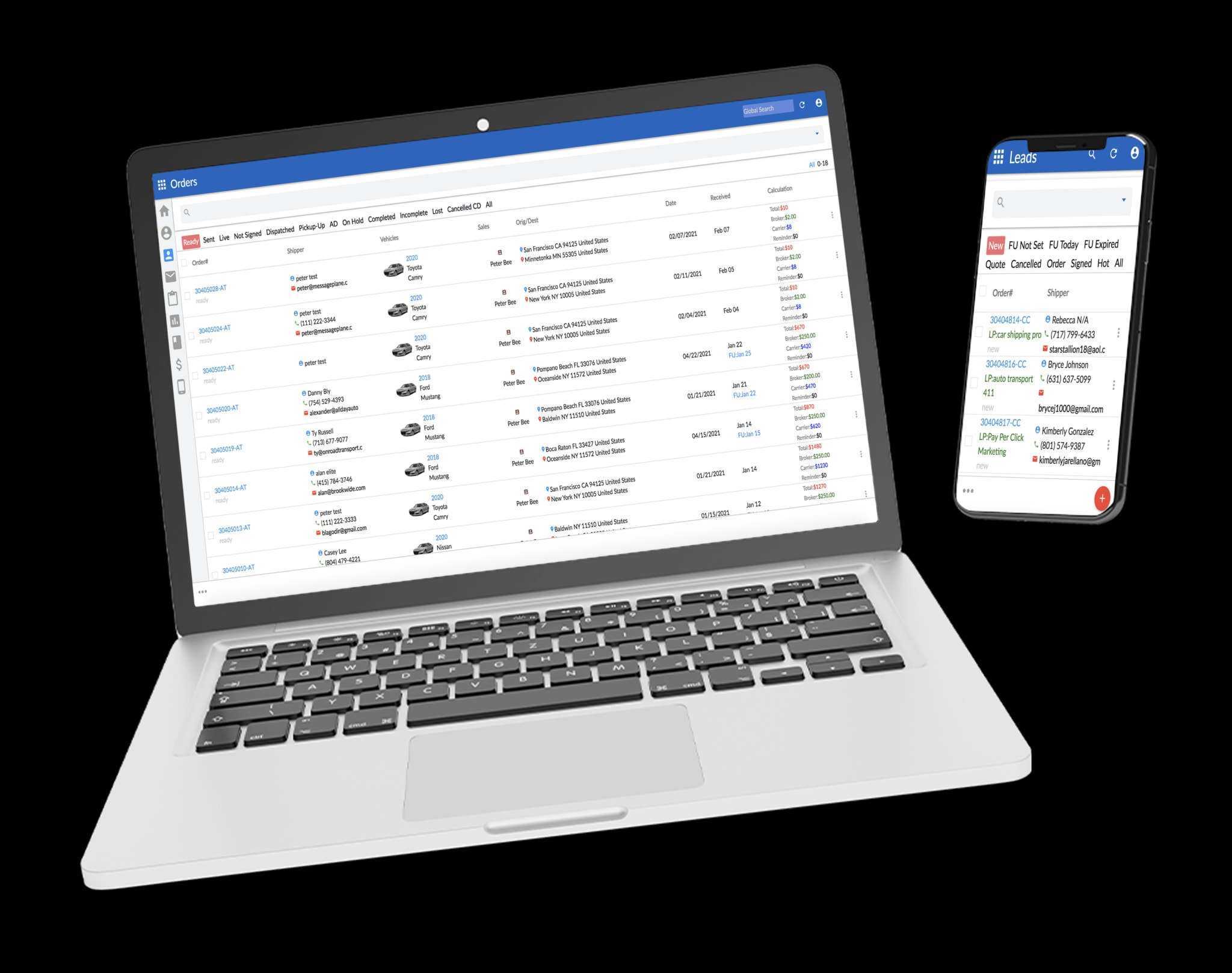






Quick Answer
Switching your auto transport brokerage to a new CRM takes five business days when you prepare the right exports and schedule dedicated training. The migration process covers lead data, active orders, carrier contacts, and dispatch history—with most brokers overlooking their load board export. Message Plane CRM, a specialized auto transport platform headquartered in Wilmington, Delaware, has processed over 800,000 vehicle transports and guides brokerages through complete data migrations. Updated March 2025.
What Data Should You Export Before Starting a CRM Migration?
The export most brokers forget is their dispatch history from Central Dispatch or Super Dispatch. Everyone remembers to pull their customer list and active orders. But carrier performance data—on-time rates, communication logs, damage claims—lives in your load board integration, not your CRM. Without it, you're starting fresh with carriers you've worked with for years.
Before day one of migration, you'll need four clean exports. First, your lead database with contact info, source tracking, and follow-up status. Second, all active and recently completed orders with pickup and delivery details. Third, your carrier contact list including MC numbers, insurance expiration dates, and preferred lanes. Fourth—and this is the one that trips people up—your dispatch history showing which carriers actually performed well.
Data mapping (matching old fields to new ones) happens during onboarding. The support team reviews your exports and identifies any formatting issues before import. Most brokerages find their customer data imports cleanly, but carrier records often need manual review for duplicate MC numbers or outdated insurance info.
Plan for 2-3 hours of export work across your current systems. If your existing CRM doesn't offer bulk export, you may need to request data directly from their support team—start this process a week early. Learn more about Message Plane CRM and their import requirements before pulling your files.
Why Does the 5-Day Timeline Actually Work?
Five days works because you're not rebuilding from scratch—you're transferring existing operations into a system designed specifically for auto transport. Generic CRMs require weeks of customization. A platform built for brokers already has the right fields, workflows, and integrations ready.
Day one covers account setup and data import. Days two and three focus on load board integration (connecting to Central Dispatch or Super Dispatch) and configuring your automated follow-up sequences. Day four handles QuickBooks sync and payment processing setup. Day five is testing—running through a complete order cycle to catch any gaps before going live.
The timeline assumes you've done your homework. Brokerages that show up on day one without clean exports or with incomplete carrier records add 2-3 days to the process. As of March 2025, most migrations that stall do so because insurance certificates need verification or MC numbers don't match FMCSA records.
One consideration: don't schedule migration during your busiest shipping week. You want time to troubleshoot without customer orders piling up. Most brokers pick a slower period or run both systems in parallel for the first few days.
What Happens to Active Orders During the Switch?
Active orders transfer with their full history—every note, every carrier assignment, every customer communication. You don't lose context on shipments that are mid-transit or pending pickup. The import process maintains the timeline so your dispatch team can see exactly where each vehicle stands.
Here's what actually happens: orders import with their current status, assigned carrier, and scheduled dates intact. Electronic signatures (digital contracts signed by shippers) attached to those orders come along too, assuming your previous system stored them properly. What doesn't transfer automatically is ongoing text message threads—those need manual screenshot backup if you want to reference them later.
The tricky part is timing. Most brokers import active orders on day one, then handle any new leads that come in directly in the new system. This prevents duplicate entries and keeps your pipeline clean. For orders that close during migration week, you'll enter final delivery confirmation in the new platform rather than the old one.
This attention to order continuity shows up in how teams describe the transition. Multiple 5-star reviews mention how the platform keeps everything organized in one place.
"Using Message Plane CRM has streamlined our workflow. All customer interactions and documents are organized in one place, and the reporting tools give us better visibility into our operations. The ability to customize dashboards has been especially helpful for our dispatch team."
— Statewide Logistics, Facebook Review
That kind of organization matters most when you're mid-migration and need to find order details quickly.
How Long Does Training Actually Take?
Core functions take one session; full proficiency takes 7-14 days of actual use. There's a difference between knowing where buttons are and moving through your daily workflow without thinking. The onboarding process accounts for both.
Initial training covers order entry, quote generation using Rapid Rate (AI-powered pricing calculations), and dispatch assignment. Most dispatchers pick this up in 60-90 minutes. The follow-up sessions—usually scheduled for days 3, 7, and 14—cover automation setup, carrier management, and reporting. These happen after you've had time to use the system and come back with real questions.

Team size affects training timelines. A solo broker might be fully operational in a week. A five-person office with different roles—sales, dispatch, accounting—needs staggered sessions so everyone learns their specific workflows. Current 2025 guidelines recommend having at least two people trained on each core function for coverage.
The browser-based design helps here. Since there's no app to download or software to install, training can happen on any device with internet access. Your team can practice between sessions without IT setup delays.
What Makes Brokers Hesitate—And Should It Stop You?
The fear of losing data mid-switch stops more migrations than actual data loss ever does. It's a reasonable concern. You've built carrier relationships, customer histories, and pricing benchmarks over years. But the risk comes from poor preparation, not from migration itself.
Common hesitations include: "What if my carriers don't get dispatched properly?" and "Will my automated follow-ups stop working?" Both have straightforward answers. Dispatch integration testing happens on day four specifically to catch carrier communication issues. And your existing automation sequences import as templates—you review and activate them rather than rebuilding from memory.
The difference between hesitation and smart caution is preparation. Smart caution means exporting your data early, running parallel systems for the first few days, and scheduling migration during a manageable week. Hesitation means staying with software that doesn't fit your workflow because change feels risky.
This practical benefit shows up consistently in how teams describe the switch after completing it.
"We switched to Message Plane CRM after trying several other platforms, and the difference is night and day. Lead tracking, dispatching, and carrier communication are now centralized in one system. The automation features save us hours every week, and it's much easier to keep clients in the loop."
— Jeff Howard, Facebook Review
The "night and day" comparison comes after the learning curve—not before it. Expect a few awkward days while muscle memory catches up.
When Should You Keep Your Old System Running in Parallel?
Run both systems for 3-5 days if you have orders scheduled for delivery during migration week. The goal isn't redundancy for its own sake—it's ensuring no customer falls through the cracks while your team learns new workflows.
Parallel operation works like this: new leads go into the new system only. Active orders get updated in both until delivery confirmation. Once an order closes, you stop touching the old platform. Within a week, you're operating exclusively in the new environment with the old system available for reference only.
This isn't always necessary. Brokerages with clean data exports and no mid-transit orders can cut over completely on day five. The question to ask: "If something goes wrong with the new system on day one, can I still serve my customers?" If the answer requires your old CRM, keep it accessible.
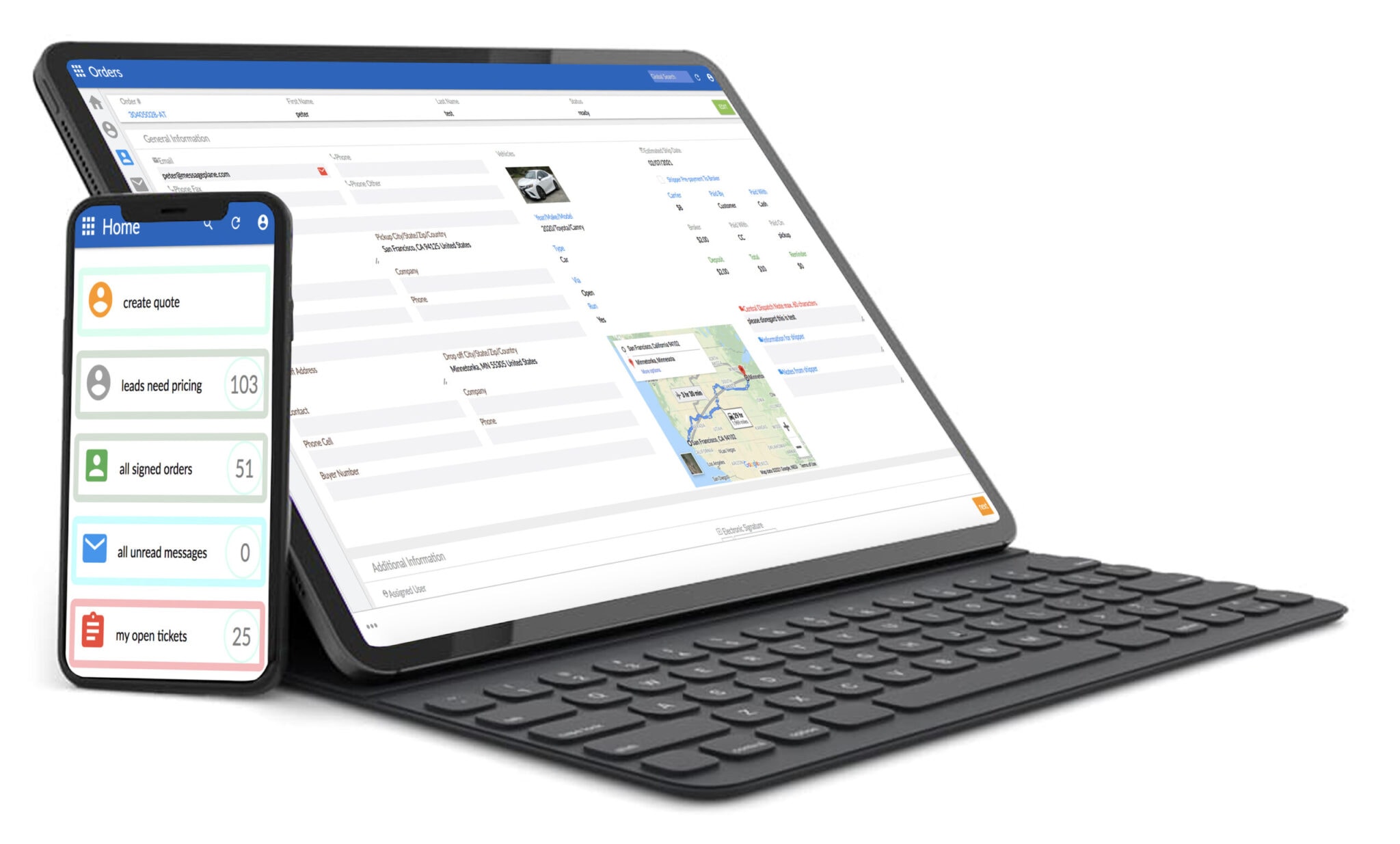
The conversation logging feature becomes particularly valuable during parallel operation—your team can see exactly what's been communicated regardless of which system originated the message.
"MessagePlane has made it much easier to keep conversations organized across our team. We're no longer digging through emails or texts to see what was said to a client. Everything is logged, searchable, and actually useful day to day"
— Car Shippers, Other Review
That searchability matters when you're checking whether a customer received their pickup confirmation—regardless of which system sent it.
What Should You Expect After the First Month?
Automation savings become measurable around week three—most brokers report 5-10 hours weekly recovered from manual follow-ups. The first month is about establishing new habits. The second month is when efficiency gains show up in your numbers.
By day 30, your team should have completed several full order cycles in the new system. BOL generation (bills of lading for transport documentation) feels automatic. Carrier assignments happen without double-checking load board sync. Customer status updates go out without manual intervention.
What takes longer: building confidence in the reporting tools. Understanding which dashboards matter for your specific workflow requires running through a few billing cycles. The platform has delivered more than 4 million automated texts and emails across its user base, but knowing which automations work for your customer base takes experimentation.
Support during this period happens via email and support tickets around the clock. Most questions after the first month involve customization rather than basic operation—how to tweak follow-up timing, how to filter carrier searches, how to build reports for specific metrics. Contact Message Plane CRM directly for questions about your specific setup.
The 5,000+ monthly active users across the country have gone through this same curve. The Wilmington headquarters has processed these transitions since 2016, which means the onboarding process has been refined by thousands of migrations. Explore more local business insights for additional guidance on evaluating professional service providers.
Key Takeaways
- Most auto transport brokerages can complete a full CRM migration in 5 business days with proper preparation
- Message Plane CRM's onboarding team handles data mapping for leads, orders, and carrier contacts during the switch
- Exporting dispatch history from your current load board integration prevents gaps in carrier performance tracking
- Training typically runs 7-14 days, but core functions like quoting and order entry can be learned in the first session
- Wilmington-based brokers benefit from Message Plane's dedicated support during the transition period
Frequently Asked Questions
How do I export data from my current auto transport CRM?
Most CRMs offer bulk export in CSV format through settings or admin panels. Pull four files: leads, active orders, carrier contacts, and dispatch history. If bulk export isn't available, contact your current provider's support team at least one week before migration to request your data files.
Will my load board integration stop working during a CRM switch?
Load board connections transfer during migration without downtime when scheduled properly. Central Dispatch and Super Dispatch integrations get tested on day four before going live. Your carriers continue receiving dispatch notifications throughout the transition with no gap in communication.
What happens to electronic signatures on existing contracts during migration?
Electronic signatures attached to orders import with the order records assuming your previous system stored them in exportable format. Verify your current platform's export includes attached documents before day one. Any signatures stored only as images may need manual backup to reference later.
How long before automated follow-ups work after switching CRMs?
Automation sequences import as templates and get activated during training sessions on days three through seven. Most brokers have their follow-up emails and texts running within the first week. Testing each sequence with a sample lead catches timing or content issues before customer-facing deployment.
Can Wilmington auto transport brokers get local support during CRM migration?
The platform's headquarters operates from Wilmington, Delaware, with support available via email and tickets around the clock. Onboarding sessions accommodate Eastern time schedules, and the team has guided local brokers through migration since 2016 with dedicated assistance throughout the 7-14 day training period.
Contact Message Plane CRM
Address: 1207 Delaware Ave #4442, Wilmington, DE 19806
Phone: +18442758555
Website: https://messageplane.com/


.svg)

%20(1).avif)
.svg)




.svg)











%20(1).avif)
%20(1).avif)